Learn a new language the most effective way.
FluentED brings together everything you need to speak a foreign language in one app: a purpose-built system that takes you to fluent conversation, spaced review that keeps you from forgetting what you learn, videos with bilingual subtitles and books that translate any word with a single tap. Everything is explained in your own language.
One sentence, five stages.
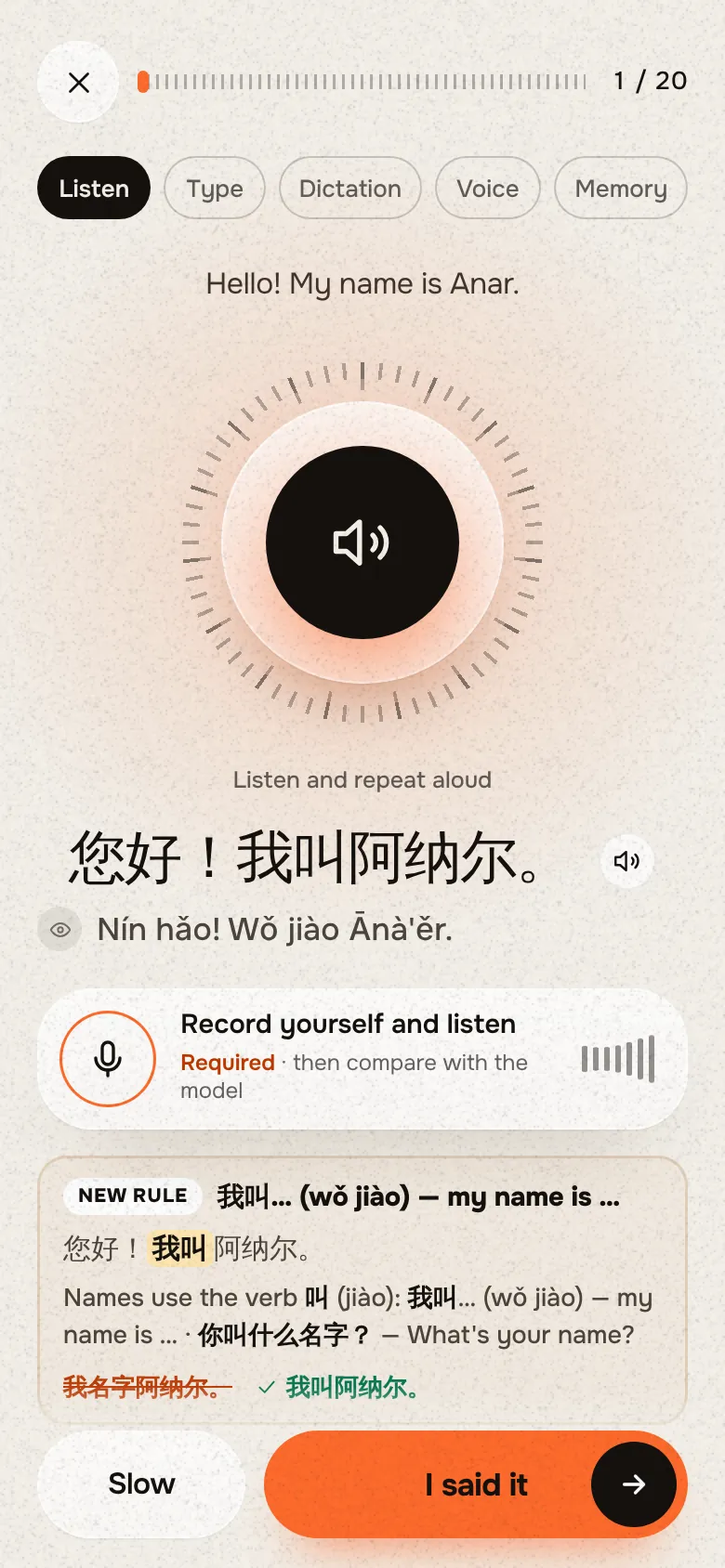
Every new sentence comes to you in five steps, from easy to hard. First you listen and get to know it; by the last stage you say it on your own, with no help at all.
It shows your mistake and explains why in plain words.
When you speak, the app listens to your voice and marks the words that did not come out clearly. When you write, it finds your grammar mistakes, explains in your own language why they are wrong and shows the correct form.
Pronunciation check
What I heard: “Quiero un pero grande.”
The double “rr” in “perro” (dog) is a strong rolled r. A single tap of the tongue turns it into “pero” (but), a different word.
Ich möchte bitte zahlen.
The “ch” in “möchte” is not a harsh throaty sound: bring the middle of your tongue close to the roof of your mouth and say it softly.
Сколько это стоит?
In “сто́ит” the stress falls on the first syllable, so the “o” must be pronounced clearly.
Writing check
Ayer voy fui al aeropuerto en autobús.
“Ayer” (yesterday) points to the past, so the verb “ir” has to be in the past tense: “fui”, not “voy”.
Gestern ich bin bin ich ins Kino gegangen.
In German, when a sentence starts with a time word like “Gestern”, the verb (“bin”) comes before the subject (“ich”).
Я иду в школе школу.
When you show direction (where to?), the noun after “в” takes the accusative case (Винительный падеж): “в школу”.
It won’t let you forget what you learn.
Repeating a new sentence once is not enough: a few days later it is gone. FluentED brings each sentence back right when you are about to forget it, so what you learn moves into long-term memory.
Each review is a little harder than the last. If you get a sentence wrong, the system sends it back to the first stage.
Pick the mode that fits your time and place.
Switch modes from the home screen with one tap, whenever you like. Whichever mode you practise in, your place and your results are saved to your account.
Full practice
The main practice mode. You listen to the sentence, type it, check yourself with dictation, record your voice and finally say it from memory.
Listening
Put your phone in your pocket and your headphones on. Each sentence plays first in your language, then in the language you are learning.
On the go · at the gym · doing chores
Nuestro vuelo se retrasóretrasówas delayed dos horas.
Reading
Read short texts and dialogues on everyday topics. Tap a word you don’t know and its translation opens on the screen.
Chinese sentences come with their reading too.
In Chinese and Arabic every sentence has a simple reading in Latin letters underneath. Even if you can’t read the characters yet, you can read and say the sentence from day one.
- Hide the reading with the eye button and test yourself
- Type your answer in characters or in Latin letters
- New grammar rules are explained right inside the lesson, above the sentence
Watch the videos you love with bilingual subtitles.
Paste the link of any YouTube video. A translation in your language runs right under the original subtitles. Tap a word you don’t know and the video pauses and shows what it means.
- Tap a word: the video pauses and you see the translation
- Replay any line or slow the speech down
- Set the subtitle size and colour the way you like
- Add new words to your list, then review them with cards
Works with every YouTube video that has subtitles in the language you are learning. You can also open video files from your device with an .srt subtitle file.
Read books without looking things up, with translation built in.
Upload your own book or pick one from the built-in library. Tap an unknown word once to see its translation; press and hold to translate the whole sentence.
- Supports EPUB, FB2, PDF, TXT and DOCX
- Built-in library: stories and classics for every level
- Words you pick go to a separate list so you can practise them with cards later
- Books you upload stay on your own device only
From zero to C1.
When you first sign in, you choose the language you want to learn and your current level. As you progress, the sentences get longer and the topics go deeper. Every sentence comes from real life:
café · airport · job interview · doctor · travel · shopping
- A1The most important words, simple sentences and first-meeting phrases.
- A2Everyday conversations and the key dialogues you need when travelling.
- B1–B2Explaining your ideas with ease, joining discussions and speaking without pauses.
- C1Speaking fluently on complex topics, with natural expressions and a lively style.
- 8languages to learn
- 5practice stages
- 3different modes
- 2devices, one account
Choose the plan that suits you.
Every plan unlocks every feature of the app and all languages. The only difference is how long you get access.
- 8 languages, all in one plan
- Full practice, Listening and Reading modes
- Pronunciation and grammar checks
- Video and book sections
- 2 devices, results saved to your account
- 8 languages, all in one plan
- Full practice, Listening and Reading modes
- Pronunciation and grammar checks
- Video and book sections
- 2 devices, results saved to your account
- 8 languages, all in one plan
- Full practice, Listening and Reading modes
- Pronunciation and grammar checks
- Video and book sections
- 2 devices, results saved to your account
Have a code? Start →
Use the language you learn in real conversation.
The app checks both your pronunciation and your writing and explains clearly, in your own language, where the mistake is.
It works on your phone and on your computer. Your lessons are saved to your account, so you can start on one and carry on with the other.
With FluentED you don’t just read sentences with your eyes: you hear them, type them and say them out loud. You fix your mistakes on the spot, and after a while you say the same sentence freely, without thinking.
Start in three steps.
- 1
Get a code
Message @fluentedcom on Instagram. Right after payment we send you your access code.
- 2
Create an account
Tap “Start”, enter your code and open your account with your email.
- 3
Add it to your home screen
Add the site to your phone’s home screen and use it like a regular app, with nothing to download from the App Store or Google Play.
Frequently asked questions
Which languages can I learn?
With FluentED you can learn English, Russian, German, Spanish, French, Italian, Arabic, Chinese and Azerbaijani. Explanations and translations are shown in your own language, and you can switch languages whenever you like.
Where do I download the app?
There is nothing to download from a store. FluentED opens right in your browser. Pin it to your screen with your phone’s “Add to Home Screen” option and it opens and works like a regular app on iPhone, Android and computer.
What level can I start from?
You can start from absolute zero (A1) or continue from your own level. There are A1, A2, B1-B2 and C1 levels. You choose a level when you first sign in and can change it later in the settings.
How much time do I need each day?
It depends on your goal. You decide how many new sentences to learn each day, and the app adds the reviews from earlier days to your daily plan by itself. What matters most is practising every day.
Is the payment monthly or one-time?
There are three options: monthly ($14.99), 3 months ($34.99) and a one-time lifetime plan ($87.99). Nothing is charged to your card automatically: when your period ends, you extend it with a new code only if you want to. With the one-time plan you pay once and use it forever.
Can I try it before buying?
Yes, there is a free 1-day trial. No code or card details are needed, you just create an account. For 24 hours from the moment you sign in you can try the main sections of the app yourself.
How many devices can I use?
You can use one account on 2 devices at the same time (for example, your phone and your computer). All your results are saved to your account, so even if you change phones, your lessons and saved words are not lost.
What does the AI check?
In voice practice it listens to the sentence you say and shows which words you didn’t pronounce correctly. In written practice it finds your grammar mistakes and explains the rule simply, in your own language.
Start speaking today.
Practise every day, so the words you learn are on the tip of your tongue when you need them.